

Unreal projects rarely fall apart because of one bad decision. They get slower to work in because of a hundred small ones: a Blueprint that everyone touches, a folder nobody owns, a texture named final_v3, a feature that quietly depends on the level it was built in. The conventions below are the ones that have held up for us across multiple UE5 projects and team sizes. None of them are clever. All of them are cheaper to adopt at the start than to retrofit.
Folders: one root, organized by feature
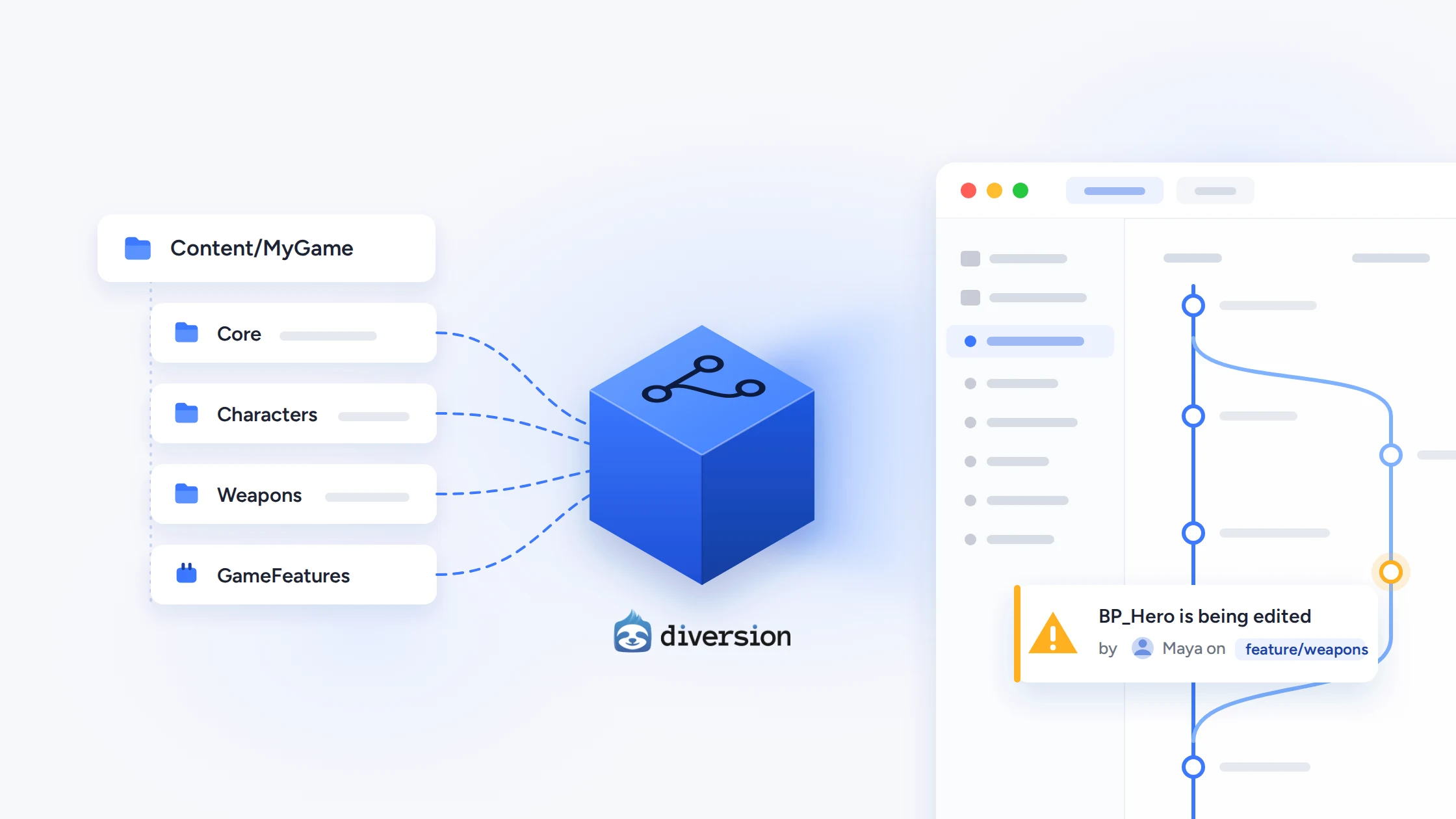
Put everything you author under a single top-level folder named after the project: Content/MyGame/. Marketplace and third-party content stays in its own top-level folders and is never edited in place. This makes it obvious what is yours, keeps external packs from colliding with your assets, and makes migrating content between projects painless.
Inside that root, organize by domain rather than asset type. Characters/Hero/ holds the hero's Blueprint, skeletal mesh, animation Blueprint, materials, and textures together. Type-based folders (Blueprints/, Materials/, Textures/) feel tidy at 50 assets and collapse at 5,000, because nobody can tell which texture belongs to which thing anymore.
Content/
  MyGame/
    Core/          # shared foundations: master materials, base UI, root data
    Characters/
    Weapons/
    Environment/
    UI/
    Maps/
  Developers/      # engine-supported per-user scratch folders
  ThirdParty/      # marketplace packs, untouched
Turn on the engine's Developers folder and make people use it for experiments. Scratch work in a personal folder never sneaks into a shipping build, and it is trivial to clean up when someone leaves.
Plugins and Game Feature Plugins
Once a chunk of gameplay is self-contained (a game mode, a weapon system, a photo mode), it belongs in a Game Feature Plugin under Plugins/GameFeatures/. Game Features can add components to actors, register data, and run custom actions on activation, and they can be switched off entirely. Lyra is the reference implementation and worth reading even if you never ship its code.
The dependency rule is strict and simple: features depend on the core game module, never the reverse. If the base game needs to know a feature exists, the boundary is in the wrong place. Plain plugins are for reusable tech with nothing game-specific in it, such as a save system or a debug menu: anything you would want in your next project on day one. Plugins also enforce module boundaries, since you cannot reference a module you have not declared as a dependency, and that guardrail gets more valuable every month.
Where C++ ends and Blueprint begins
The split that has worked best: C++ owns systems and base classes, Blueprints own data and composition.
Base actors, components, and subsystems live in C++ with exposed UPROPERTY knobs and BlueprintNativeEvent hooks. Designers create Blueprint children that set values, assign meshes, and wire up VFX and audio. Anything that runs every frame, touches replication, or manages a non-trivial state machine goes in C++. Anything that amounts to "pick this mesh, this sound, and tune these numbers" is a Blueprint.
Keep Blueprint inheritance shallow, two or three levels at most. Deep Blueprint-to-Blueprint chains create load-order surprises and circular references that are miserable to untangle. Prefer interfaces over casting, UPrimaryDataAsset subclasses over hard-coded configuration, and Gameplay Tags over enums and booleans as the shared vocabulary between systems. The Level Blueprint gets level-specific triggers and nothing else.
A practical test: if a change would need a text diff to review properly, it belongs in C++. Blueprint diffs exist, but nobody enjoys reviewing them.
Naming
Pick a convention on day one and enforce it with a tool, not a code review. Epic's recommended prefixes are a fine starting point: BP_, SM_, SK_, T_, M_, MI_, MF_, WBP_, DA_, ABP_, NS_, IA_, IMC_, plus GA_ and GE_ if you use the Gameplay Ability System. Follow the prefix with BaseName_Variant_Suffix, so T_Hero_Body_D, T_Hero_Body_N, T_Hero_Body_ORM.
Enforce it with the Data Validation plugin and a small custom validator, or one of the naming-validation plugins on Fab, and run it on save and in CI. Humans do not read 400 renamed assets in a pull request. Also fix up redirectors after every rename or move; stale ones accumulate quietly and cause confusing load and cook problems later.
Shared assets
Genuinely shared assets (master materials, base widgets, root data tables, the top of your Gameplay Tag hierarchy) go in Core/ or in their own plugin. Every top-level folder gets a named owner. Core never references a feature; the arrow only points one way.
Open the Reference Viewer and Size Map regularly. It is remarkably easy for a small UI widget to pull an entire level into memory through a stray hard reference. When you find one, fix the dependency instead of duplicating the asset; duplicates drift and you end up with three master materials. For large sets of content, register Primary Asset Types with the Asset Manager and load on demand rather than referencing everything from a single hub.
Version control is part of the structure
Everything above is also a decision about your repository. Unreal content is binary: a .uasset cannot be three-way merged, so two people saving the same file means one of them loses work. Good structure is mostly about making that collision rare. Feature folders with clear owners mean two people seldom touch the same asset on the same day. Logic in C++ means the changes that need real review are text. Shallow Blueprint hierarchies mean one conflicted file does not block five other people.
Go further and split assets that attract traffic. A single BP_GameManager or one giant data table that every designer edits is a conflict generator; break it into per-feature assets so ownership is clear. Commit .uproject, Config/, Source/, Content/, and your own Plugins/; ignore Binaries/, Intermediate/, Saved/, and DerivedDataCache/. Diversion sets up a default .dvignore with these covered when you initialize an Unreal repo, which spares a new project the classic first-week mistake of committing a gigabyte of build output. Commit small and often, because a week of unsaved work on binary assets has no partial recovery.
Branching in a team
Branches are how a team works on the same project without stepping on each other, and they matter more in Unreal than in a typical codebase precisely because merges are so limited. The model that works: main always packages and always runs. Feature work happens on short-lived branches, one per task, merged back within days rather than weeks. Milestones (vertical slice, demo, submission) get a stabilization branch so bug fixes can land without freezing everyone else. Engine upgrades get their own branch too; move to the new version there, let the cook and the tests pass, then merge, rather than upgrading main in place and hoping.
The weak point in this model is binary content. File locking solves the problem on a single branch: check out the asset, edit it, check it in, and nobody else can touch it meanwhile. It does nothing across branches. Two people on two feature branches can both edit BP_Hero for a week, and neither finds out until the second merge, when one of them has to redo their work. The bigger the team and the more branches in flight, the more often this happens, and the more people quietly stop branching to avoid it, which defeats the point.
This is the specific problem Diversion's Unreal Engine plugin is built around. Beyond the usual source-control integration in the editor, it does cross-branch conflict prevention: when you open or save an asset that someone else is already editing, even on a different branch, you get a warning in the editor that names who is editing it and which branch they are on. The conflict is caught before it exists, when the fix is a quick conversation instead of a lost afternoon. Combined with native handling of large binaries and locking, it lets a team keep the branching model above without the tax that usually comes with it.
Get the boundaries right, enforce them with tools instead of goodwill, and choose version control that understands what an Unreal project actually is. The project will still be pleasant to open two years from now.


