Dear community,
World Cup season is here, and we’re bringing our own lineup: a redesigned app, stronger branch protection, Unity Asset Store launch, and a few updates your repo will cheer for. Let’s kick it off 😉
🎨 A redesigned Diversion app
Diversion got a glow-up. We refreshed the app layout to make everything faster to find, easier to navigate, and smoother to work with day to day.
Here’s what’s new:
- New top bar - global search with Cmd/Ctrl+K, so you can jump to almost anything in a second, plus a one-click light/dark mode toggle.
- New left navigation rail - quick access to Files, Commits, Graph, Reviews, and Merges.
- Workspace bar - your branch picker, sync status, collaborators, and workspace switcher now live together in one clean row.
- Org breadcrumb and repo picker - switch between organizations and repositories without losing your place.
🧹 Obliterate: permanently remove files and their history
Some files should never have been there in the first place. Huge accidental commit? Secret pushed by mistake? Files that need to be gone-gone? Repo admins can now use Obliterate to permanently remove file content and its history from a repository.
You can:
- Target files with glob patterns, including Perforce-style wildcards.
- Preview exactly what will be removed before confirming.
- Run it directly from the CLI.
🎮 Diversion is now on the Unity Asset Store!
Unity users, we made setup even easier. Diversion is now available on the Unity Asset Store, so you can install our Unity integration directly from the editor - no manual setup required.
The integration now runs as a standalone connector, without depending on the Desktop app, and includes a clear Connect to Diversion flow if Diversion isn’t installed yet.
Love the plugin? We’d really appreciate a review on the Unity Asset Store
👀 Whitespace changes are now visible in diffs
Tiny formatting changes can cause surprisingly big “wait, what changed here?” moments. Reindents, tabs vs. spaces, and trailing spaces are now visible by default in the diff view - with spaces shown as dots and tabs shown as arrows.
Prefer the cleaner view? You can turn it off from the diff dropdown using Show whitespace changes, and Diversion will remember your choice.
.webp)
🔒 Stronger branch protection
Branch protection just got a lot better at actually protecting branches.
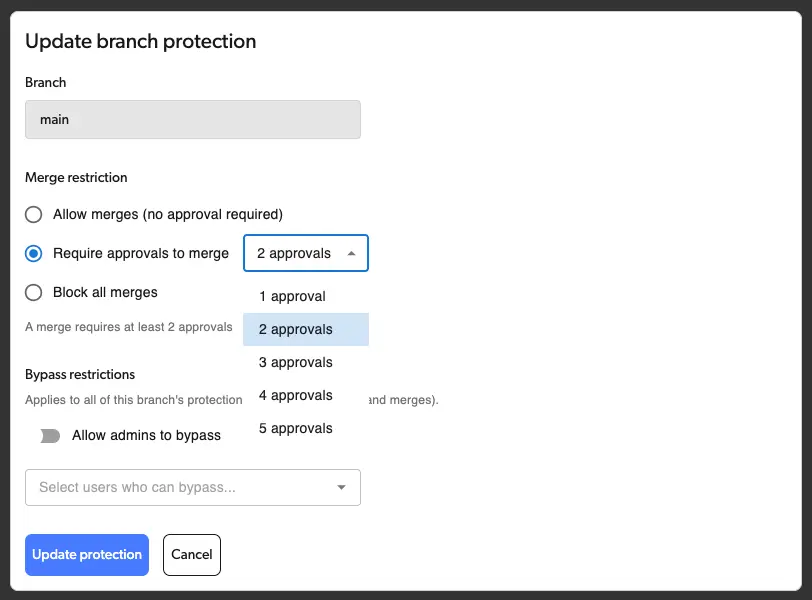
Protected branches now block merges too - not just direct commits - including review merges and draft publishes. You can also require a minimum number of approvals before merging, and the Merge button now clearly explains why it’s blocked, like “2 of 3 approvals.” Fewer mystery blockers. Fewer accidental merges. More confidence before changes land.